



Battery Compatibility Across Equipment Generations
Equipment may go through hardware and software revisions during its production life. Controllers, chargers, connectors and mounting parts can change while the product name remains unchanged.
A battery that fits the compartment does not automatically work with every revision. Compatibility depends on electrical limits, charging, communication, mechanical interfaces and operating behavior.
This guide explains how OEMs can define and verify battery compatibility across equipment generations.
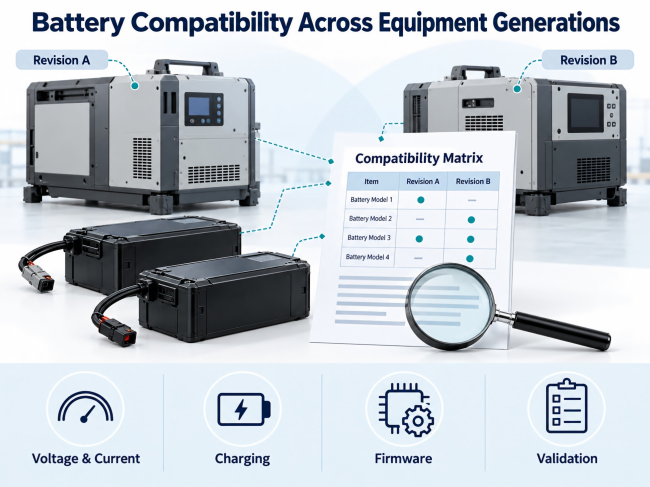
1. Define the Compatibility Scope
A compatibility statement should identify a specific combination of equipment, battery, charger and software.
Record:
Equipment model and hardware revision.
Equipment firmware.
Battery model and revision.
Battery firmware and settings.
Charger model and configuration.
Mounting arrangement.
Connectors and wiring.
Operating restrictions.
Avoid statements such as “works with all versions” unless the stated combinations have been assessed.
2. Create a Compatibility Matrix
A matrix records which combinations have been approved.
The following example illustrates the format. It does not describe actual products.
| Equipment | Battery | Charger | Firmware | Status |
|---|---|---|---|---|
| Revision A | Pack A | Charger A | Specified version | Approved |
| Revision A | Pack B | Charger A | Not evaluated | Unverified |
| Revision B | Pack B | Charger B | Specified version | Approved |
| Revision B | Pack A | Charger B | Not evaluated | Unverified |
Link each approval to test records and technical documents.
Update the matrix when a relevant component, setting or software version changes.
3. Check the Voltage Range
Nominal voltage alone does not establish compatibility.
Check the battery’s full-charge voltage, operating range and protection thresholds against the equipment’s input requirements.
Include:
Motor controllers.
DC-DC converters.
Computers and displays.
Relays and contactors.
Auxiliary circuits.
Verify behavior during startup, load changes and shutdown.
Two batteries carrying the same nominal voltage label may have different operating limits.
4. Confirm Current Requirements
An equipment revision may change its motors, actuators, sensors or operating sequence.
Document:
Continuous battery current.
Transient current.
Transient duration.
Repetition rate.
Charging current.
Regenerative current, where applicable.
Review cells, BMS components, protective devices, interconnections, cables and connectors.
Capacity alone does not establish whether a pack can support a current event.
5. Review Connectors and Pin Assignments
A connector housing does not identify every electrical function.
Confirm:
Connector and mating-part numbers.
Polarity.
Power pins.
Signal pins.
Current requirements.
Contact sequence.
Cable specifications.
Battery identification signals.
An equipment revision can retain the connector shell while changing its pin assignments.
Where incompatible connections are possible, define identification, keying and installation controls.
6. Confirm Mechanical Fit
Check the battery in the intended equipment assembly.
Review:
Dimensions and tolerances.
Mounting points.
Rails.
Locks and latches.
Connector alignment.
Cable clearance.
Removal path.
Service access.
Mass requirements.
For removable packs, verify insertion, retention and removal.
Installation in one prototype does not establish fit across production tolerances.
7. Verify the Charging Arrangement
Identify the charger used with each approved combination.
Review:
Charging voltage and tolerance.
Current.
Termination behavior.
Temperature limits.
Communication.
Identification.
Restart behavior.
Fault response.
Include charger firmware and settings where they affect operation.
Do not assume that an existing charger remains suitable after a battery revision.
If operation during charging is permitted, verify that mode separately.
8. Define BMS and Equipment Responses
The BMS and host need agreed responses to battery conditions.
Document:
Voltage warnings.
Temperature restrictions.
Current limits.
Protective disconnection.
Sleep.
Wake-up.
Fault recovery.
Distinguish status information, host commands and local protective actions.
The equipment should respond according to its design when the battery restricts operation or disconnects.
Essential local battery protection should not depend solely on host communication.
9. Check the Communication Protocol
Using the same interface does not establish that two devices interpret data in the same way.
Verify:
Interface type.
Communication settings.
Message identifiers or registers.
Units and scaling.
Byte order.
Update intervals.
Timeouts.
Fault codes.
Command permissions.
Version identification.
For example, the host must interpret the battery’s current value using the specified units and scaling.
Test missing, invalid and unsupported messages.
10. Record Firmware Compatibility
Firmware can change product behavior without changing the enclosure or label.
Record the versions used during validation.
Define:
Supported host firmware.
Supported battery firmware.
Required settings.
Update procedures.
Version-mismatch behavior.
Recovery after an interrupted update.
Use an approved version or documented compatibility rule.
Changes affecting charging, protection or control require review.
11. Define Battery Identification
Equipment may identify a battery through:
A resistor.
A dedicated signal.
A stored identifier.
A communication message.
An authentication process.
Document what the identification process checks.
Recognizing a model does not establish battery condition or verify every operating requirement.
Define the response to an unknown or unreadable identifier. Do not bypass identification to force operation.
12. Validate Runtime and Indication
Electrical connection does not establish task duration.
Equipment revisions may use different loads or control settings. Battery revisions may have different capacity or operating limits.
Verify:
Task completion.
Usable energy under defined conditions.
State-of-charge display.
Low-energy warnings.
Shutdown reserve.
Runtime estimates, if provided.
State of charge is an estimate. Do not present a displayed percentage as a guaranteed operating time.
13. Check Storage and Wake-Up Behavior
Document the procedures for each battery revision.
Include:
Storage conditions.
Standby consumption.
Sleep or shipping mode.
Wake-up sources.
Charger connection behavior.
Host initialization.
Failed wake-up response.
Provide the relevant instructions to service personnel.
Do not use improvised charging or activation methods on an inactive battery.
14. Review the Installed Environment
Equipment changes can affect the battery’s surroundings.
Check:
Enclosure layout.
Airflow.
Adjacent heat sources.
Seals.
Drainage.
Cleaning procedures.
Cable openings.
Vibration exposure.
Verify the installed arrangement.
If a protection rating is stated, identify the assembly and test conditions supporting that rating.
15. Test the Intended Combinations
Define acceptance criteria before testing.
| Test Area | Verification |
|---|---|
| Voltage | Operation across the approved range |
| Current | Continuous and transient loads |
| Startup | Sequencing and voltage response |
| Charging | Profile, termination and fault handling |
| Communication | Interpretation and timeout behavior |
| Firmware | Specified version combinations |
| Mechanical fit | Retention, alignment and removal |
| Thermal behavior | Cell and component temperatures |
| Shutdown | Host response and data handling |
| Recovery | Restart, wake-up and fault clearance |
Record equipment, battery and charger identifiers.
A demonstration of normal operation does not replace the agreed validation plan.
16. Document Replacement Procedures
Replacement instructions should state:
Covered equipment revisions.
Required charger.
Required firmware.
Mounting parts.
Installation steps.
Restrictions.
Checks after installation.
Identify replacement parts through controlled labels and documents.
If an adapter is used, assess its wiring, ratings, mechanical behavior and signal handling. Joining two connectors does not establish system compatibility.
17. Review Document Coverage
A battery or integration change may affect assessment records, equipment documentation and warranty conditions.
Confirm the required review with the responsible manufacturer and assessment body.
Do not assume that documents covering one combination cover every revision.
Transport documentation and equipment compatibility evidence serve different purposes.
OEM Compatibility Checklist
Before approval, confirm:
Equipment and battery identifiers.
Voltage ranges.
Current requirements.
Connector definitions.
Mechanical fit.
Charging arrangement.
BMS behavior.
Communication.
Firmware.
Environmental conditions.
Validation records.
Service instructions.
Document coverage.
Record unresolved items as open requirements.
Frequently Asked Questions
Can One Battery Be Used Across Equipment Generations?
Yes, when each intended combination has been defined and validated.
Does the Same Connector Establish Compatibility?
No. Electrical functions, charging, communication and mechanical requirements also need verification.
Can Firmware Address a Compatibility Issue?
It may address supported communication or control behavior. It does not replace required hardware capability.
Can an Adapter Establish Compatibility?
An adapter is part of the interface. The complete arrangement still needs assessment.
What if a Combination Has Not Been Tested?
Record it as unverified and complete the required review before approval.
Preparing the Compatibility Record
Identify the equipment, battery, charger and firmware involved.
Document their interfaces and operating behavior. Validate the intended combinations and maintain the compatibility matrix for production and service use.

 E-mail


 +86 13510702894